Available Field crew management

FSM

All field work in one place - from the work order, through crew assignment and completion, to report approval and settlement.

FSM organizes and automates the work of a water utility's field services. Dispatchers have full, real-time control over work orders and teams, while crews can work even out of network range - thanks to a companion mobile app that synchronizes data once connectivity returns. No more paper workflow and scattered knowledge about work orders.
+48 505 901 805
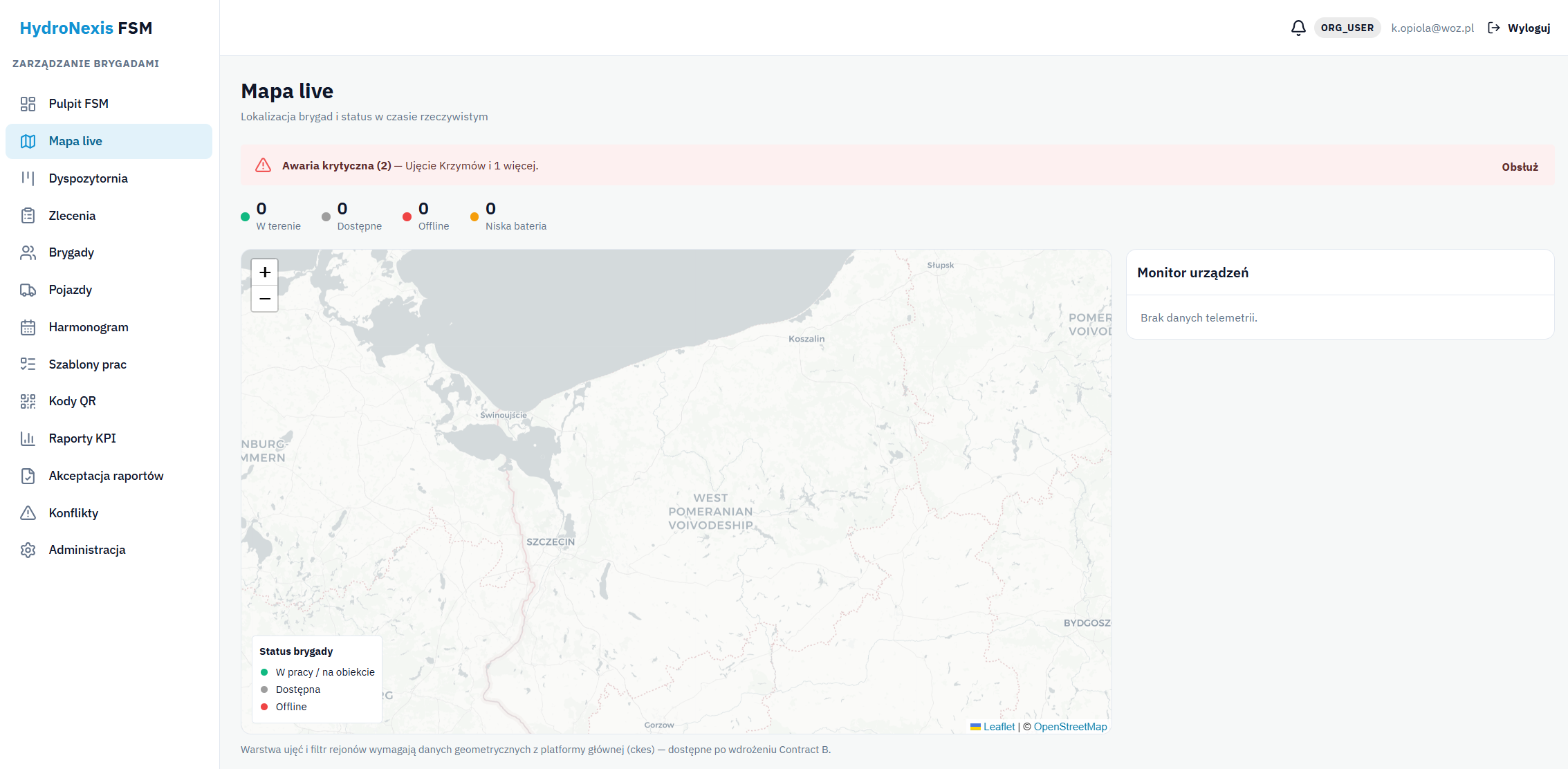
FSM - live map with crew locations and device monitor

Three problems we solve

We know them from the daily work of a water utility's field services.

Scattered information about work orders

Requests live in phones, notes and spreadsheets. FSM consolidates the entire work-order flow - from creation, through assignment, to the field report - into a single, reliable record of technical work.

No visibility into the field

Without current locations and team workload, sound decisions are hard to make. The live map shows where crews are and which devices need attention - in real time.

Paper and missed deadlines

Paper reports and manual SLA tracking lead to backlogs. FSM automatically highlights overdue work orders, standardizes documentation and eliminates re-keying data.

Who FSM is for

Dispatchers

People who assign and steer crew work - needing a dispatch board, a live map with team positions, and fast assignment of work orders, including emergencies.

Planners and service managers

People who plan inspections and maintenance and settle the work - needing a schedule, recurring tasks, checklists and KPIs with compliance control.

Field crews

Teams servicing intakes, wells and water meters in the field - needing a simple mobile app that works even without coverage, with QR codes and checklists.

What FSM can do

One environment for the entire field work cycle - from creating a work order to its approval and settlement.

Dispatch board (kanban)

A board of work orders grouped by status, with drag-and-drop status changes and one-gesture crew assignment. Alternatively, a weekly calendar showing team workload.

Work orders and their lifecycle

Work orders linked to an asset, with a category, priority and deadline (SLA) and automatic numbering. A controlled status flow without invalid transitions, a full change history and PDF export of the order card.

Live map and device monitor

Crew positions in real time with online/offline distinction, plus a device monitor (battery level, connectivity, time of last contact). The view refreshes automatically.

Recurring tasks

Repetition rules (daily, every N days, weekly, monthly, quarterly) automatically generate work orders for the chosen horizon. Periodic inspections are created without manual setup.

Templates and checklists

Standardized checklists with sections (general / per asset / closing) and points of various types: yes/no, text, number, photo. Repeatable quality and complete documentation regardless of who performs the work.

Offline mobile app

Crews download the day's work orders and work even without coverage: completing checklists, adding photos, voice notes and signatures, confirming arrival. Data synchronizes once connectivity returns.

Asset QR codes

Generate and print a QR code for an asset, including a bulk export of a whole district's codes to PDF. After scanning, the technician immediately identifies the asset and confirms arrival on site.

Report approval and conflicts

A formal approval stage: the dispatcher accepts the work or rejects it with a justification (returning it to execution). Detected discrepancies between offline work and the system are reconciled safely.

Reports and KPIs

Crew workload, work orders by asset, backlog (overdue) and a compliance report (water permits / SANEPID). Export to PDF and Excel for management and institutions.

Why FSM

What sets FSM apart from generic service management tools.

Offline work with safe synchronization

Water infrastructure is often out of network range. The app assumes work without connectivity and, once it returns, reconciles the data and detects conflicts - without loss or overwriting.

Purpose-built for water utilities

Work categories, assets (intakes, treatment plants/SUW, wells, water meters) and the compliance report for water permits/SANEPID are matched to the realities of a water utility - less "tuning" the tool to fit.

One login, shared data

FSM is a module of the HydroNexis platform (WMS, Control, GIS). It shares login and reference data about assets - without duplicate records and discrepancies between systems.

Proof of work and fast response

Arrival confirmation (QR code / geolocation) provides objective proof of presence, and unhandled failures are automatically escalated - with notifications in the portal, by e-mail, SMS and push.

How it works in practice

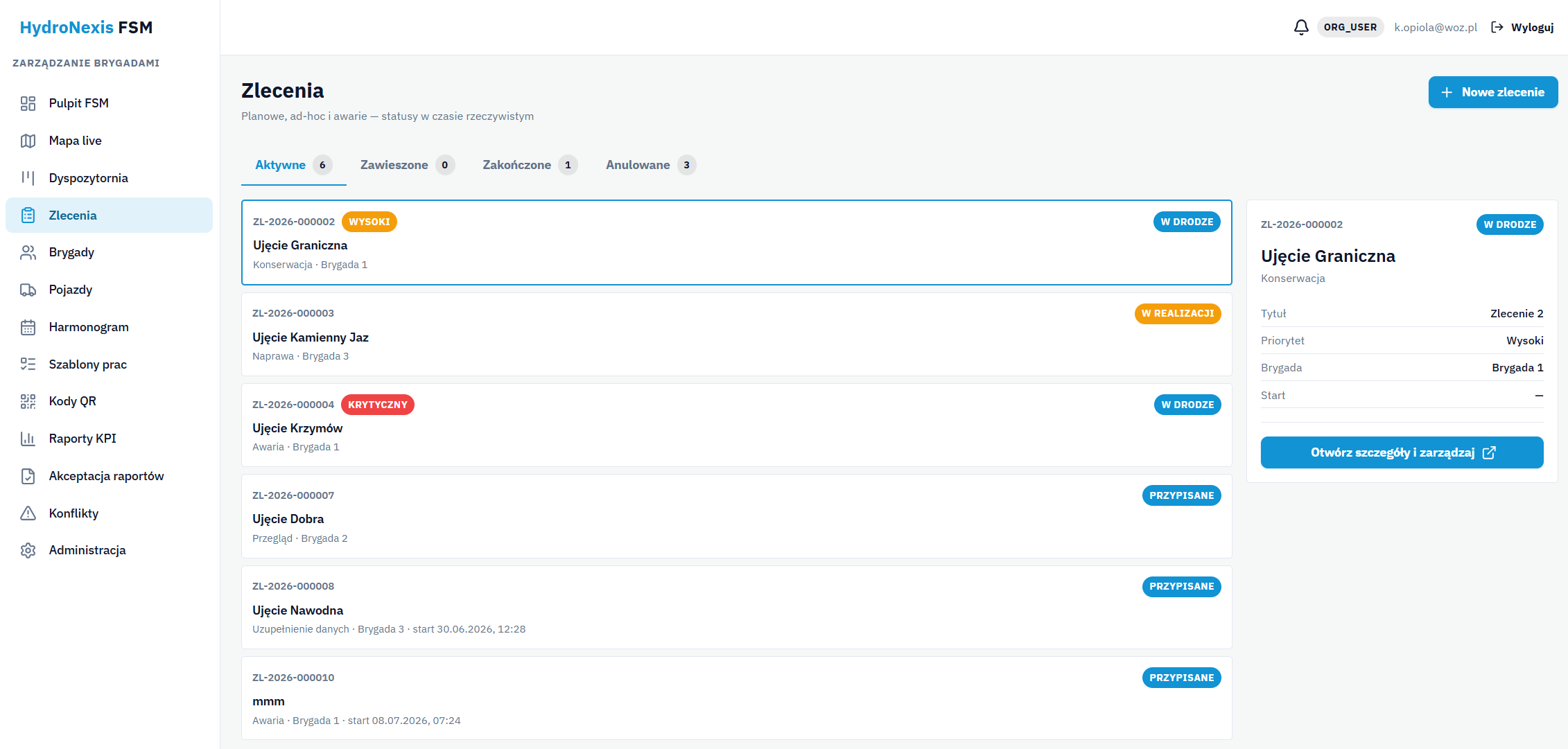
Screenshots from the FSM dispatcher portal deployed at a water and sewage network operator.

FSM - work order list with priorities, categories and statuses
Work orders and their lifecycle

Planned, ad-hoc and emergency work orders with real-time statuses, priorities (including high, critical) and categories (maintenance, repair, inspection, failure). A details panel with the full history.

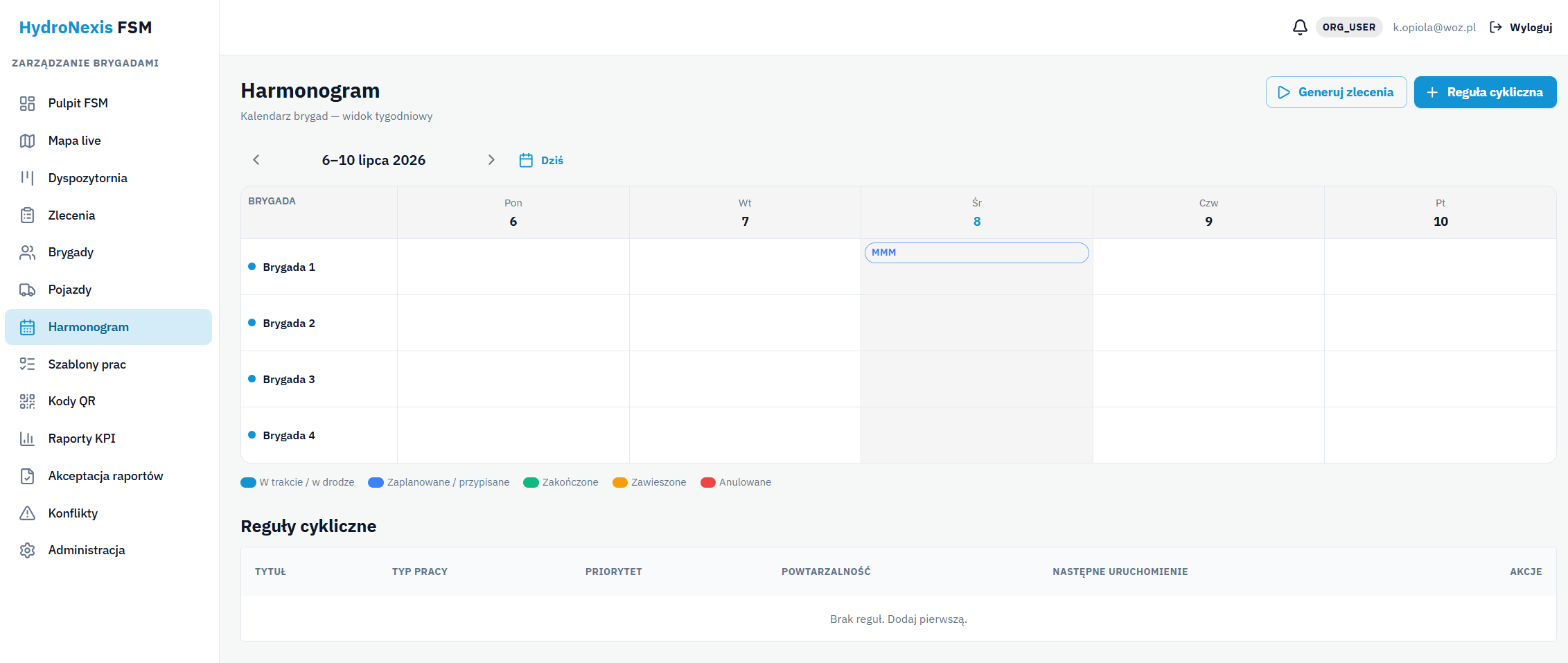
FSM - schedule: weekly crew calendar and recurring rules
Schedule and recurring tasks

A weekly calendar with crews in rows and days in columns, plus recurring rules that automatically generate work orders for the chosen horizon. Planning without manual work.

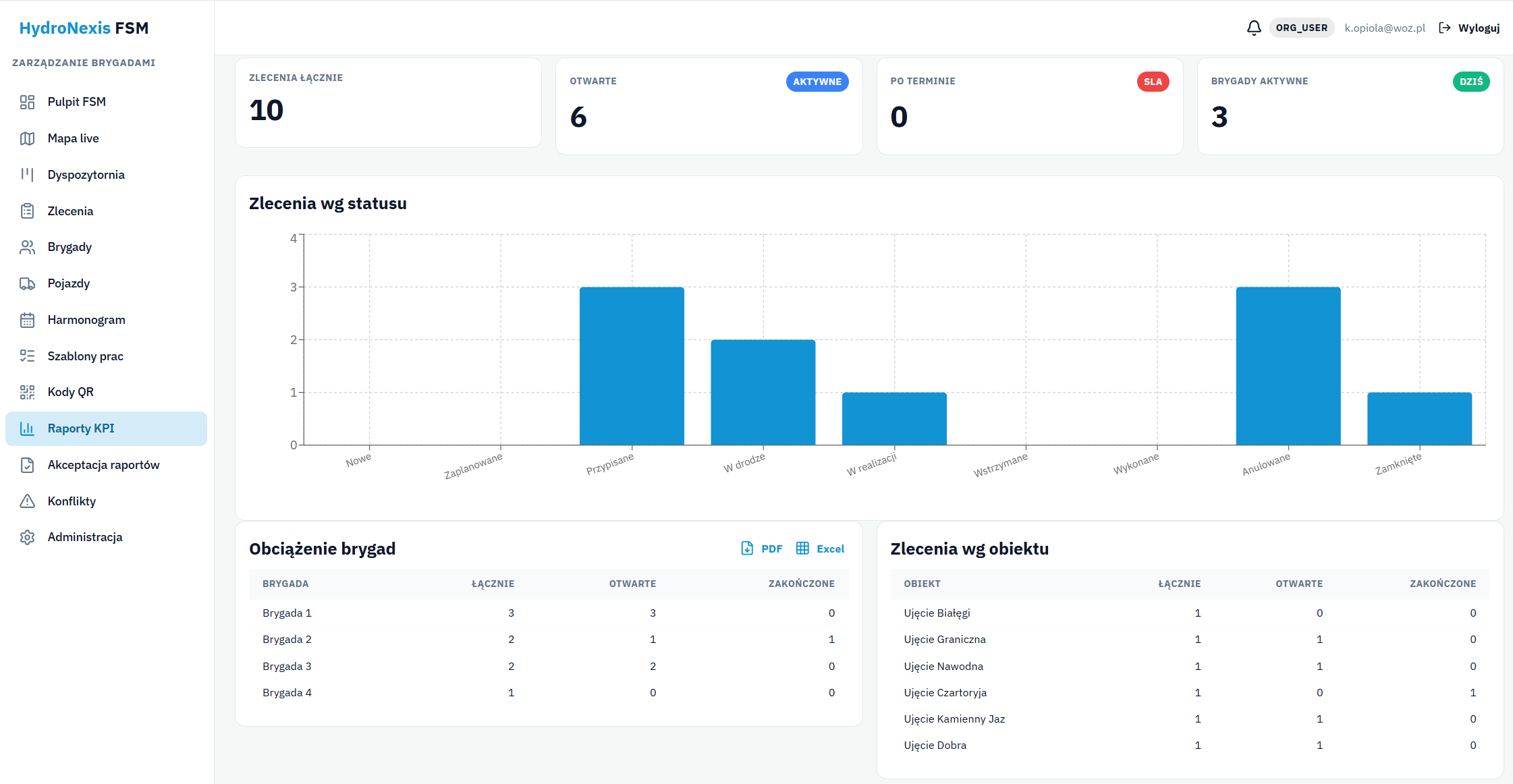
FSM - KPI reports: crew workload, work orders by asset, backlog
Reports and KPIs

Daily tiles (open work orders, overdue, active crews), a chart of work orders by status, and breakdowns: crew workload and work orders by asset. Export to PDF and Excel.

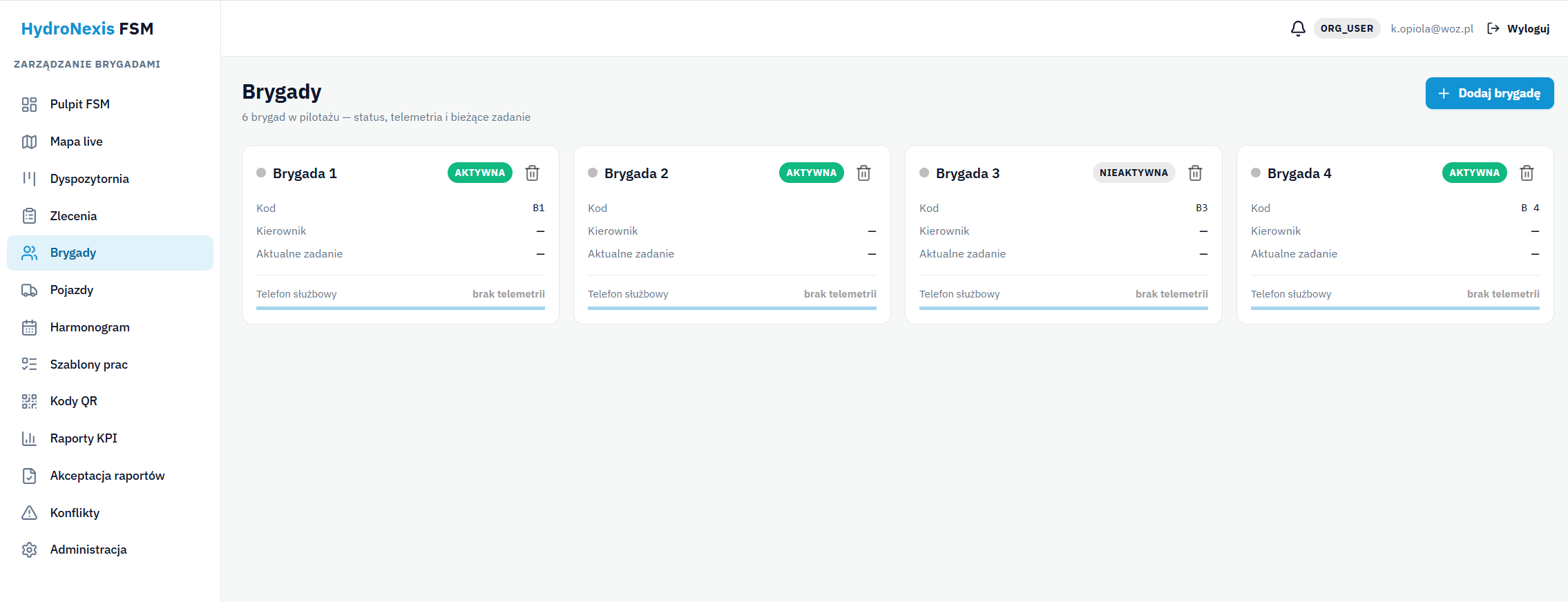
FSM - crews: composition, status and current task of teams
Crews and teams

Crew cards with status, code, manager and current task, with an assigned company phone and telemetry. The basis for accurate assignment of work orders to teams.

Integrations

FSM is a module of the HydroNexis platform - it uses its data and channels, without duplicating.

HydroNexis platform

Shared login (SSO) and reference data - districts, intakes and assets, users, and permit information. One consistent environment, without duplicate records.

Mobile app (Android)

A companion app for technicians in the field: downloading work orders, offline work, confirming arrival, completing checklists, photos and synchronization.

Notification channels

An in-portal bell and e-mail, SMS and push notifications in the mobile app. Key events, especially failures, reach the right people instantly.

Map background

Presentation of crews and the field situation on a map - a clear, geographic picture of team work in real time.

What your team gains

Time savings

Recurring tasks are generated automatically, and reports and order cards are produced in a single click. No more re-keying data.

Deadlines met

SLA control and highlighting of overdue work orders ensure that urgent and outstanding work is handled first.

Complete documentation

Every work order has a full history: statuses, arrival confirmation, photos, working time and notes - reliable material for acceptance and audit.

Data-driven decisions

KPIs and reports (workload, backlog, compliance) reveal bottlenecks and risks, and the live map supports dispatch decisions on an ongoing basis.

Frequently asked questions

FSM is available and being deployed at an operator in the water sector. The dispatcher portal runs in a browser, and technicians use a mobile app on a company phone. Deployment covers configuration of crews, districts, work templates and permissions, plus team training. Because FSM uses HydroNexis platform data, there is no need to re-enter assets. We agree on the scope after a demo is requested.

Yes. The mobile app works offline - a crew downloads the day's work orders, completes checklists, takes photos, dictates voice notes and confirms arrival even without a signal. Once connectivity returns, data is automatically synchronized with the system. If a work order's status changed in the back office in the meantime, FSM detects the conflict and lets the dispatcher resolve it safely - without data loss.

For each asset (intake, well) you can generate and print a QR code - including a bulk export of a whole district to a PDF file. The technician scans the code with a phone, which identifies the asset and confirms arrival on site. Arrival confirmation can also be based on geolocation or recorded manually. This provides objective proof of presence linked to a specific work order - useful for settlements and audits.

Completed work orders go to approval. The dispatcher reviews the field report (checklist, photos, working time, notes) and approves it or rejects it with a reason - a rejected order returns to execution. An automatic approval mode is also available. As a result, only verified work is formally closed, and every work order has a full, auditable history.

Yes. FSM is a module of the HydroNexis platform and shares login (SSO) and reference data with it - districts, intakes, assets and permit information come from the parent system (WMS), so there is no need to duplicate them. Thanks to the shared environment, FSM forms a consistent whole with the Control and GIS modules. We agree on the scope of data exchange between modules during deployment.

Key events - a new work order, a critical alert, a report awaiting approval - are signaled across multiple channels: an in-portal bell and e-mail, SMS and push notifications in the mobile app. Unhandled critical events (failures) are automatically escalated to supervisors, so none are missed. Channels and preferences (including "quiet hours") can be configured.

Yes. Just fill in the "Request a demo" form - we will get back to you within 24 hours and arrange a presentation tailored to your organization. We will show the dispatch board, the live map, work orders, the schedule and reports in action, and discuss the scope and terms of deployment. No obligation and no cost.

Request an FSM demo

We will show the dispatch board, the live map and crew work in action. No obligation.

+48 505 901 805